Floral Vector Pattern with Butterflies: A Practical Guide to Blue Botanical Assets
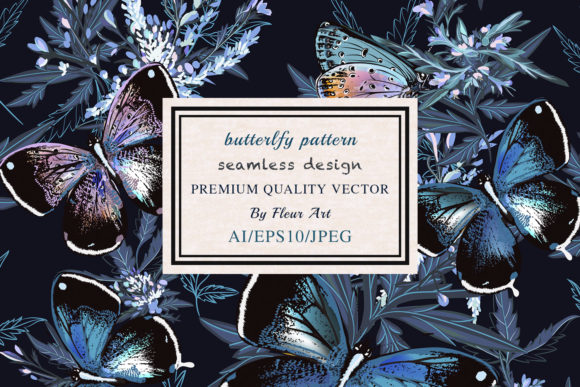
A well-executed floral vector pattern with butterflies offers a timeless aesthetic that bridges the gap between vintage charm and modern design. When this motif is rendered in shades of blue, incorporating leaves and plants, it creates a versatile backdrop suitable for everything from wedding stationery to textile printing. However, the visual appeal of a preview image often masks technical realities that can derail a project. Many designers and business owners select these assets based solely on color harmony or stylistic preference, only to discover later that the file structure does not support their intended application. Understanding the specific technical parameters of a high-resolution botanical asset is just as important as its artistic merit.
Evaluating File Formats Beyond the Preview
The most frequent oversight occurs when users assume all downloadable files are universally compatible. This specific asset package includes 1 AI, 1 EPS10, and 1 JPEG at 5000x5000px. Treating these formats as interchangeable is a mistake that leads to workflow bottlenecks. The JPEG is a rasterized snapshot; while excellent for web mockups or digital proofs, it lacks the mathematical paths required for scaling. If you attempt to resize a 5000px JPEG for a large-format banner or shrink it for intricate packaging without loss, you will encounter pixelation or blurring.
Conversely, the EPS10 and AI files are true vectors. A common misunderstanding involves the "EPS10" designation. Some creators assume this implies compatibility with every version of Adobe Illustrator or third-party vector software released in the last decade. In reality, EPS10 is a legacy format designed for broad compatibility, but it may flatten complex gradients or transparency effects found in newer versions. Before purchasing or downloading, verify that your software supports EPS10 import without expanding live effects into static shapes. If your editing workflow relies heavily on adjusting individual gradient meshes or opacity masks within the pattern, you must prioritize the native AI file over the EPS to maintain full editability.
Resolution and DPI Misconceptions in Print Production
For those utilizing the included JPEG for print applications, the specification of 450 dpi at 5000x5000px is significant, yet often misinterpreted. Standard commercial printing typically requires 300 dpi. Having 450 dpi provides a safety buffer, allowing for approximately 33% enlargement before dropping below professional print standards. However, this buffer has limits. A miscalculation here results in muddy details on physical products like ceramic tiles or fabric yardage.
Always calculate your final output size before committing to the raster file. At 450 dpi, a 5000px dimension yields a printable area of roughly 11.1 inches by 11.1 inches. If your project demands a seamless repeat larger than this dimension, the JPEG is insufficient regardless of its high DPI. You must use the vector source files to generate a new raster export at the exact dimensions needed. Relying on upscaling algorithms to stretch a 5000px image to fit a duvet cover will inevitably degrade the crispness of the butterfly wings and leaf veins, making the final product look amateurish despite the high-quality source material.
Navigating Color Management in Blue Tones
Blue floral patterns present unique challenges in color reproduction that differ from warmer palettes. Blues are notoriously difficult to match across RGB screens and CMYK presses. A vibrant royal blue on your monitor may translate to a dull navy or purple-shifted hue in print. This discrepancy is not necessarily a defect in the floral vector pattern with butterflies, but rather a failure in color space management.
Before applying this pattern to physical media, check the color profile embedded in the AI or EPS file. Vector files are sometimes saved in RGB for screen vibrancy. If your printer requires CMYK, converting the file yourself allows for controlled adjustment of the blue channels. Blindly sending an RGB vector file to a commercial printer invites automated conversion processes that you cannot control. Test prints are non-negotiable when working with blue botanical themes. Verify that the contrast between the butterflies and the background foliage remains distinct after conversion, as blue-on-blue compositions can lose definition in subtractive color mixing.
Understanding Seamless Repeatability and Edges
Not all floral patterns tile perfectly, even when marketed as such. A critical evaluation step involves testing the repeat before finalizing any layout. Open the vector file and create a grid of three-by-three tiles. Inspect the seams where the pattern meets itself. Look specifically for clipped butterfly wings or severed plant stems at the boundaries. While professional assets are constructed with mathematical precision, file conversions or previous edits can sometimes disrupt alignment points.
If you plan to rotate or scale the pattern, re-test the seamlessness. Scaling a vector pattern by non-integer percentages can occasionally shift anchor points relative to the artboard edge, creating visible grid lines in the final texture. Always lock your pattern swatch or use dedicated pattern-making tools within your vector software to ensure the blue floral elements flow continuously. Assuming the pattern is flawless because the thumbnail looks good is a risk that manifests only after hours of layout work have been completed.
Licensing and Usage Boundaries
Technical suitability is only half the equation; legal appropriateness is equally vital. Users frequently conflate "downloading" with "owning." Review the license terms associated with this floral vector pattern with butterflies to understand usage caps. Some licenses permit unlimited personal projects but restrict commercial units sold. Others may prohibit using the pattern as a standalone digital product or require attribution for certain applications.
Misunderstanding these terms can lead to cease-and-desist notices or unexpected royalty fees. For entrepreneurs and small business owners, clarity here protects your brand. If you intend to use this blue botanical design on merchandise for sale, confirm that the license covers physical product manufacturing. Digital-only licenses are common and insufficient for apparel or home decor. Additionally, check if the license prohibits trademarking. You generally cannot trademark a design containing stock vector elements, as others hold rights to the same artwork. Planning your brand identity around a non-exclusive asset requires acknowledging this limitation upfront to avoid future legal restructuring.
Editing Complexity and Layer Organization
Finally, assess the internal structure of the vector file before integrating it into complex workflows. A floral vector pattern with butterflies, leaves, and plants should ideally be organized into logical layers or groups. Poorly organized files where every element is merged into a single compound path make customization nearly impossible. If you need to change the blue hue of only the leaves while keeping the butterflies intact, grouped layers are essential.
Open the AI or EPS file and inspect the layer panel immediately. If the file consists of thousands of ungrouped anchor points or expanded text, recoloring or modifying specific elements becomes a tedious manual selection process. In such cases, global color replacement tools may be your only efficient option. Recognizing this limitation early saves frustration. If extensive customization is required and the file structure is flat, consider whether the time investment outweighs the cost of commissioning a custom variation or finding a better-organized asset. Efficient design relies not just on beautiful visuals, but on assets that respect the designer’s time and technical requirements.